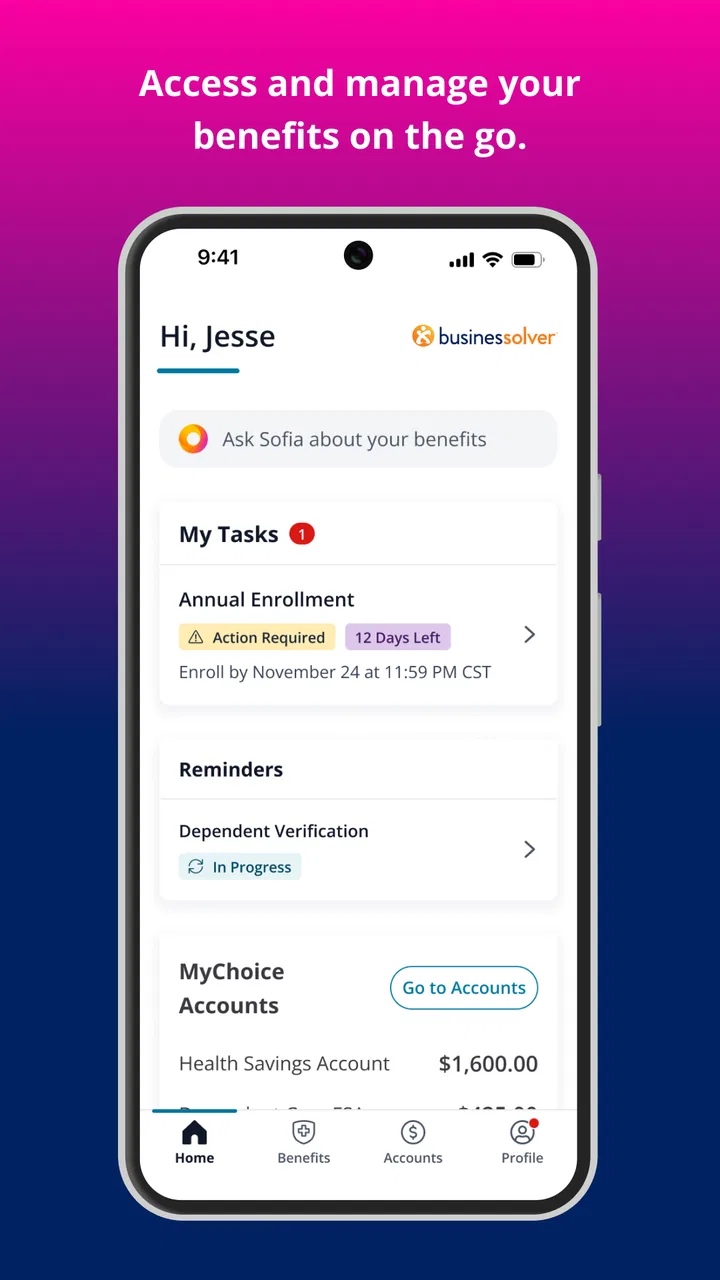
MyChoice Benefits
- 4.7
- Rating
- 500.00K
- Installs
- Free
- Price

 Analysis by App-foxy
Benefits information is easy to ignore until the moment you need it. That is where MyChoice Benefits makes sense: it is a free Business app from Businessolver for eligible users who want to reach benefits and enrollment information from a phone. I found its value less in entertainment or constant daily use and more in reducing the scramble around an important workplace decision.
The app has a focused purpose. It is not a general finance tracker, a medical record, or a replacement for every conversation with an employer’s benefits team. Instead, it gives eligible users a mobile route into the benefits experience. That distinction matters, because your access and the information you see depend on eligibility and on the organization using Businessolver’s platform.
How MyChoice Benefits feels when connectivity matters
The first thing I would tell a friend is to treat this as a connected service rather than a document saved on the phone. The useful moments involve reaching current enrollment information, reviewing available choices, or checking details when a decision is in front of you. Those tasks normally require the app to communicate with the benefits system, so a stable connection becomes part of the experience.
You May Also Like

 Blood Strike: 2.5 Anniversary
Blood Strike’s Loadouts Turn Every Drop Into a Tactical Gamble
A close look at Blood Strike’s custom loadouts: how fast access to signature weapons reshapes its battle royale rhythm, rewards preparation, and narrows the gap between fights.

 Pandora - Music & Podcasts
Pandora’s Music Is Easy to Start, but Harder to Recover
Pandora’s strength is its low-effort path from a seed to a station. Its weak spot is how much confidence it asks you to place in connection, setup, and quiet recovery.

 8 Ball Pool
 Is Built on Rivalries, Rematches, and Routine
A close look at the rivalries, rematches, shared routines, and unanswered safety questions that turn a quick pool match into a persistent mobile community.

 Samsung Music
’s Quiet Strength Is Playing What You Already Own
Its reach comes less from spectacle than from dependable access to a personal library. That simplicity is both the app’s strongest retention engine and its ceiling.

 AccuWeather: Weather Radar
AccuWeather Review: A Quick, Clear Forecast for Everyday Decisions
For everyday plans, the best forecast is the one you can understand quickly. AccuWeather makes rain timing, radar, and local conditions easy to act on, with a few trade-offs.

 Hill Climb Racing
Why Hill Climb Racing Still Turns Crashes Into One More Run
A tiny car, a bumpy hill and one more upgrade: Hill Climb Racing keeps resurfacing because its simple chaos makes every near-miss feel personal.
More From Our News Desk



That has a practical consequence: I would not wait until the last minute to open it. If you are sitting at an airport, moving between buildings, or relying on crowded public Wi-Fi, the app may be less convenient than expected simply because the information you need is being retrieved through a network. Opening the relevant screens earlier gives you time to deal with a slow connection instead of turning a benefits deadline into a technical emergency.
This is also why the app should not be judged like a static reference guide. A downloaded brochure can be opened anywhere, but it may be outdated or difficult to search. MyChoice Benefits is more useful when you need the benefits and enrollment view associated with your eligibility, yet that usefulness is tied to access at the moment you need it.
What it is useful for on an ordinary day
Imagine receiving a reminder that your enrollment period is open while you are away from your desk. Rather than waiting to get back to a computer, you can use your phone as the starting point for checking the available information. I like that scenario because it matches the app’s strongest role: handling a time-sensitive administrative task in the place where the question occurs.
A second realistic situation is a conversation with a partner or family member about benefits. You may want to look at the information while discussing which option fits your circumstances. A phone is easier to bring into that conversation than a work computer, and the app can make the process feel less tied to a particular office or browser session.
There is a trade-off, though. A small screen is convenient for access but not always ideal for comparing complicated choices. I would use the app to locate and review the relevant information, then slow down before making a decision. If several options involve unfamiliar terms, a larger screen or a conversation with the appropriate benefits contact may be better for careful comparison.
Mobile access without pretending the phone solves everything
The app’s mobile format is most helpful for quick checks, reminders, and getting oriented. It is less compelling for someone who rarely needs benefits information or who prefers to complete every administrative task on a desktop. The right question is not whether a phone is always better, but whether having access while away from a computer removes enough friction for you.
I also would not assume that every screen behaves the same way in every employer’s setup. Businessolver provides the app, but the experience is connected to the benefits environment available to eligible users. That means the app may be valuable to one employee for enrollment while another mainly uses it to review information. Its usefulness follows the plan and access context, not just the icon on the phone.
For people who share devices or use a phone with limited storage, the app’s free price makes trying it straightforward, but installation is only the first step. You still need the right eligibility and account access for it to become useful. Someone outside an employer-supported benefits program should not install it expecting a universal catalog of insurance or workplace plans.
What to do when a connection fails
Connectivity problems are the main friction I would plan around. If a page takes too long to load, I would first move from unreliable public Wi-Fi to a stronger mobile connection, or the other way around if cellular service is weak. Closing and reopening the app can also be a sensible basic recovery step, but I would avoid repeatedly submitting an enrollment action while unsure whether the first attempt went through.
That last point is important for any benefits workflow. A slow screen is annoying; uncertainty around a submitted choice is more serious. My approach would be to wait for a clear confirmation, note what I selected, and contact the relevant support channel if the result is unclear. I would not treat a screenshot of an unfinished page as proof that a change was completed.
When access fails because of eligibility, account setup, or an employer-side issue, changing networks will not solve it. This is where the app differs from an ordinary shopping or note-taking tool. The service sits inside a benefits process, so some problems need the organization’s benefits team or the account recovery route rather than repeated attempts inside the app.
I recommend opening the app before a deadline, especially if you have not used it recently. That gives you time to discover whether you can sign in, whether your expected information is visible, and whether your connection is dependable. It is a small habit, but it separates a calm review from a rushed decision made when access is already under pressure.
Using it carefully on mobile data
I would not call the app data-heavy based on its purpose alone, and I would avoid making assumptions about its network behavior. Still, anyone with a limited mobile plan should use ordinary caution. Connect through trusted Wi-Fi when practical, avoid refreshing the same page over and over, and wait for screens to finish loading before trying another action.
There is also a privacy angle to mobile context. Benefits information can be personal, so I would avoid reviewing it on an unlocked shared device or in a crowded place where another person can easily read the screen. The app’s convenience should not encourage careless handling of sensitive choices. A quick check in a public setting may be fine, but detailed enrollment deserves a more private moment.
For a smoother session, I would prepare before opening the app: know what question you need answered, keep your account details available through an appropriate secure method, and have enough time to read the information rather than tapping through quickly. This is a more useful workflow than opening the app without a goal and hoping the right answer becomes obvious.
How it compares with the usual alternatives
The usual alternative is a desktop benefits portal. A browser on a larger screen can be better for reading long explanations, comparing several choices, and keeping multiple pieces of information visible. If you are already at a computer and starting a complex enrollment decision, I would often choose that route.
The advantage of MyChoice Benefits is access in the gaps between those desktop sessions. It fits the moment when you remember a question during a commute, need to check information away from work, or want to discuss a choice somewhere other than your desk. A paper guide may be easier to consult without a connection, but it can be less convenient to search and may not reflect the current view available to an eligible user.
Calling a benefits representative remains the better option when your situation is unusual or the wording is unclear. The app can put information within reach, but a mobile interface cannot replace personalized explanation. I see it as a practical first stop and a useful companion to human help, not as permission to guess when the consequences of a choice are significant.
Who will get the most from it
This app is a good fit for eligible employees who want benefits access in a mobile setting and do not want every question to wait for a desktop session. It is especially useful for people who travel between locations, work away from a permanent desk, or prefer to review enrollment information during a conversation at home.
It is also a reasonable choice for users who want a single place to begin when an enrollment period arrives. The app’s role is narrow enough to be understandable: open it when benefits information or enrollment is the task, not when you need general budgeting, appointment management, or broad insurance research.
I would suggest skipping it if you are not an eligible user of a Businessolver-supported benefits environment, because the app is not designed as a public comparison marketplace. I would also suggest using a desktop or direct support when you need to study dense details side by side, resolve an account issue, or confirm an uncertain submission.
What the current app details suggest
MyChoice Benefits has been available since February 17, 2017, and its current version is 3.5.5. The app requires iOS 10 or later, which keeps it accessible to users with older compatible Apple devices. It is rated for Everyone, and there is no purchase price to get started.
Its reception is strong, with a 4.7 average from around eight thousand ratings and roughly one thousand one hundred written reviews. The app has passed half a million installs, so it is not an obscure utility used by only a handful of people. Those figures do not change the need to judge it against your own eligibility and workflow, but they do suggest that the basic concept has found a substantial audience.
The developer is Businessolver, and the app sits in the Business category. I appreciate that the identity is clear rather than trying to present itself as a general wellness or finance product. That focus helps set expectations: the experience is about reaching benefits and enrollment information, with connectivity and account context shaping how useful it feels at any given moment.
My practical routine for using it
My preferred routine would be simple. I would open the app before an important enrollment window becomes urgent, check that access works, and identify where the relevant information is located. I would then use a reliable connection for the actual review, especially if the decision involves several details that I do not want to revisit under pressure.
During the decision itself, I would read slowly and keep a note of questions rather than relying on memory. If the app makes information easy to reach but the wording still leaves room for doubt, that is the moment to ask for help. Convenience should shorten the path to a good decision, not encourage a faster uninformed one.
After submitting anything important, I would look for a clear completion state and retain the information needed to follow up. If the network drops at that point, I would verify the result through the app when the connection returns or through the responsible benefits channel. This recovery-minded approach is more important than any single interface shortcut.
Overall, I see MyChoice Benefits as a useful mobile doorway into a benefits process, particularly for eligible users who need access away from a desk. Its strengths are convenience, focused purpose, and the ability to bring enrollment information into everyday situations. Its weaknesses are equally practical: it depends on connectivity, a phone screen is not always ideal for complex comparisons, and account or eligibility problems may require help outside the app.
My connectivity verdict is positive with one condition: use it as an accessible starting point, not as your only safety net. Open it early, choose a dependable connection, protect your privacy, and confirm important actions before moving on. For those habits, the free app earns a place on the phone; for complicated decisions or uncertain access, the desktop portal or a benefits representative remains the wiser companion.
FAQs for MyChoice Benefits
01What is MyChoice Benefits and how does it work?
MyChoice Benefits is a comprehensive platform designed to help users manage their employee benefits in one convenient app. It allows you to view, select, and manage your benefits package, providing detailed information on health insurance, retirement plans, and more. The app offers an intuitive interface, making it easy to navigate and understand your options.
02Is MyChoice Benefits secure to use for sensitive information?
Yes, MyChoice Benefits prioritizes user security by employing advanced encryption methods and secure login processes. The app complies with industry standards to ensure that your personal and sensitive information is protected from unauthorized access, providing peace of mind while managing your benefits.
03Can I access MyChoice Benefits on both Android and iOS devices?
Absolutely. MyChoice Benefits is available for download on both Android and iOS platforms. The app is optimized for a seamless experience on smartphones and tablets, ensuring that you can manage your benefits anytime, anywhere, regardless of the device you are using.
04Does MyChoice Benefits offer customer support for users?
Yes, MyChoice Benefits offers robust customer support to assist users with any questions or issues they may encounter. You can access support through the app or via their website, where you’ll find FAQs, contact options, and live chat support to help resolve your concerns promptly.
05What features does MyChoice Benefits offer to enhance user experience?
MyChoice Benefits offers a range of features designed to enhance the user experience, including personalized notifications, easy access to plan details, and tools to compare different benefits options. The app also provides educational resources to help users make informed decisions about their benefits packages.
Pros
- User-friendly interface for easy navigation.
- Comprehensive benefits tracking features.
- Customizable alerts for important updates.
- Secure data encryption ensures privacy.
- Quick access to support and FAQs.
Cons
- Limited offline functionality.
- Occasional app crashes reported.
- Some features require manual updates.
- In-app ads can be intrusive.
- Limited integration with third-party apps.

MyChoice Benefits
Gallery